
About Working TV Addon
By Vechrozilator
- Enable the following Experiments in world settings:
- Holiday Creator Features
- Upcoming Creator Features
Currently the TV have 20 channels in total, by default when TV is place it is in OFF state to turn it ON click on the TV, click again to switch between different channels. To switch it OFF sneak then click
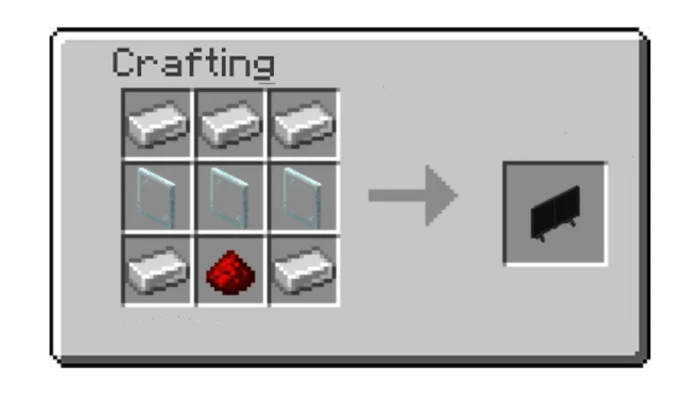
This TV can able to obtain in survival via crafting table, you can craft it like shown.
If we have TV we also need TV Stand for our TV. You can craft them with 6 quartz slab and 2 iron ingot like shown.
There are two types of TV, the Standing TV and Wall TV by default the TV is standing type, sneak then place to turn it into wall type.
Working TV Addon screenshots


How to install Working TV Addon
- Download the .mcaddon file using the button on this page.
- Open the downloaded file with Minecraft Bedrock Edition.
- Wait for Minecraft to confirm that the import has completed.
- Activate the imported pack in the world settings.
- Back up important worlds before installing community content.
Download Working TV Addon (1.20) Decorations for free
Preparing your download…
If the download did not start automatically, click here.


