
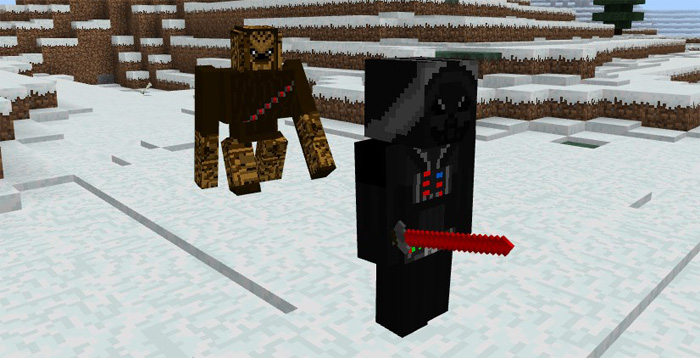
About Star Warz Addon
This addon takes some of the characters, items and vehicles from the Star Wars universe and brings them to Minecraft. Come face-to-face with Darth Vader in an epic lightsaber duel or fly to through the skies with a TIE Fighter. If you are a fan of Star Wars then you definitely have to check this out.
Creator: Spectro Anime
How does it work? The TIE Fighter (replaces the blaze) is a flying vehicle used by the Galactic Empire. Players can ride this vehicle and use it to fly long distances. However, to fly it requires “Force” which can be added by throwing snowballs at the vehicle.
iOS / Android: Long press on the vehicle and press Ride Windows 10: Right-click on the vehicle enter it
Throw a snowball at the vehicle to make it start flying. You can control the vehicle by holding a bowl in your hand.
Some of the mobs have been replaced by some characters in the Star Wars universe. For example, the iron golem is replaced by Chewbacca and he will even make those funny sounds. Brrwhhhaargh!
The swords have been replaced by lightsabers and the bow has been replaced by a blaster. All of the items cause the same amount of damage as before.
All Items / Mobs
TIE Fighter (Blaze) – Hold a bowl to control the direction, throw snowballs at it to start flying Chewbacca (Iron Golem) Darth Vader (Wither Skeleton) Stormtrooper (Skeleton) Lightsabers (Swords) The Force (Snowballs) – causes things to fly
How to install Star Warz Addon
- Download the .mcpack file using the button on this page.
- Open the downloaded file with Minecraft Bedrock Edition.
- Wait for Minecraft to confirm that the import has completed.
- Activate the imported pack in the world settings.
- Back up important worlds before installing community content.
Download Star Warz Addon Movie for free


