
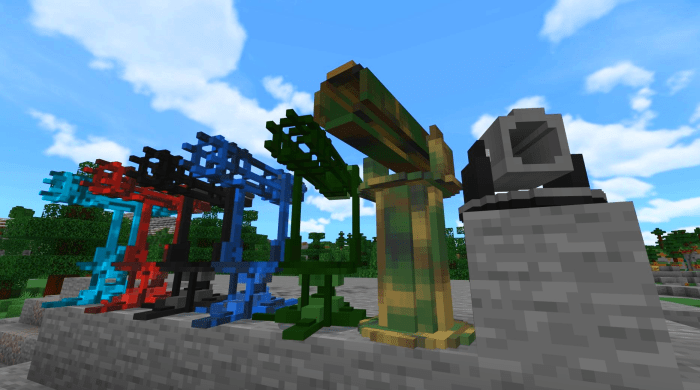
About Rocket Launchers,Landmines and Miniguns
This pack is for anyone that thinks Minecraft could use some serious military hardware.
You can get these bad, bad boys from your local weaponsmith. Neat, hey. Level the trader all the way up and the final top-of-the-range trade will be an enchanted axe. Nice! Boring! Not that nice! How about landmines or miniguns??!? You betcha. Just make sure you bring yo emeralds. And emerald blocks!
Rocket Launchers (normal blowy-up ones) Place these things down and, just like the minigun, it will target any monster. Unlike the minigun it will replace the monster with a very large hole in the ground. Use with CAUTION.
Also available from your local weaponsmith. Slightly cheaper and tougher than a minigun but quite destructive, so will wreck the landscape quite a bit.
Once these are destroyed they do not drop a spawn egg, they will be gone, gone, gone. Buy them from your friendly weaponsmith. Unfriendly weaponsmiths probably sell them also. Bargain price of 20-something emeralds. They don’t break blocks (it’s a kind of magic).
Landmines Block Breakers (red light) Place them down, and you have five seconds to get out of the trigger-zone. After that, if anything comes within a few blocks, there’ll be a boom.
Non-block Breakers (yellow light) As for the above, but no breaking of blocks. Consider them your personal anti-personnel mines. Cheaper and easier to trade for.
Miniguns These are all sorts of nasty. Place one down and it’ll shoot any monster. Many times.
How to install Rocket Launchers,Landmines and Miniguns
- Download the .mcaddon file using the button on this page.
- Open the downloaded file with Minecraft Bedrock Edition.
- Wait for Minecraft to confirm that the import has completed.
- Activate the imported pack in the world settings.
- Back up important worlds before installing community content.
Download Rocket Launchers,Landmines and Miniguns (1.14, 1.16, 1.17) Weapon for free


