
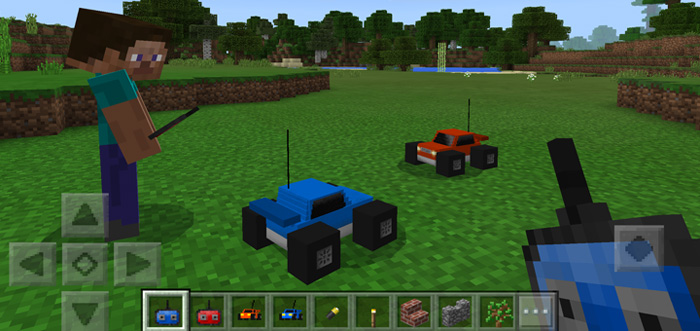
About RC Car Addon
This add-on replaces two of the mobs in-game with radio-controlled cars. You control an RC car by using the throw mechanism to decide where you want your car to drive. It’s a really fun and creative add-on which never really been done before. The add-on is very well made and includes custom sounds, particles and other cool details. You’ll love it!
Creator: Vladu11
How does it work? The radio-controlled cars are sold by vendors in villages. There are two different RC cars each responding to a different controller. (This means it’s friendly for multiplayer!).
Before using an RC car you need to charge it. For that you will need a battery (replaces gold nuggets).
iOS / Android: Hold a battery in your hand, long press on the RC car and press Charge Windows 10: Hold a battery and right-click on the RC car to charge it During the charging process you’ll see some cool particles and hear some sounds. It takes just a few seconds to fully charge.
You can now control the vehicle by using the corresponding controller.
Blue Controller (Egg) – Blue RC Car Red Controller (Snowball) – Red RC Car
Throw the controller similar to throwing an egg or a snowball to control the vehicle. It has a limited reach so don’t throw it too far away.
You can despawn a car by killing it. But it won’t give up without a fight. However, it takes no more than two hits to kill it so it’s not really any danger.
Features Mobs Blue RC Car (Wither Skeleton) Red RC Car (Stray) RC Car Seller (Villager) Items Blue RC Car Spawn Egg (Wither Skeleton Spawn Egg) Blue Controller (Egg) Red RC Car Spawn Egg (Stray Spawn Egg) Red Controller (Snowball) Battery (Golden Nugget) General Features RC Cars follow targets summoned by the controllers Targets are invisible Custom sounds for car engine, villagers and more RC Cars can be renamed with name tags Battery lasts for 5 minutes and then you need to recharge it Supported languages: English, Spanish, Portuguese, German You can trade materials with the RC Car Seller to get RC cars, batteries and controllers
How to install RC Car Addon
- Download the .mcpack file using the button on this page.
- Open the downloaded file with Minecraft Bedrock Edition.
- Wait for Minecraft to confirm that the import has completed.
- Activate the imported pack in the world settings.
- Back up important worlds before installing community content.
Download RC Car Addon Transport for free


