
About Potion+
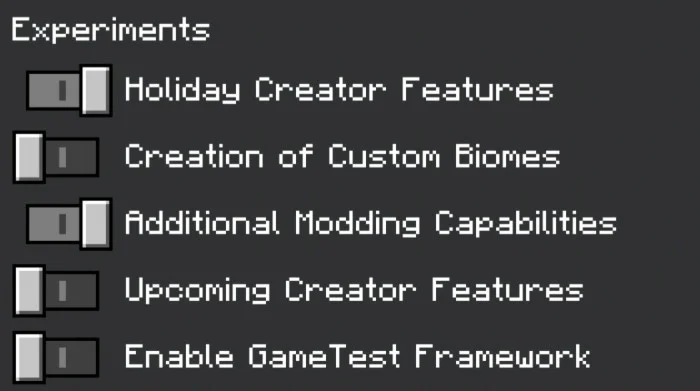
*Don't forget to enabled the following Experiments option in world settings
- Holiday Creator Features
- Additional Modding Capabilities
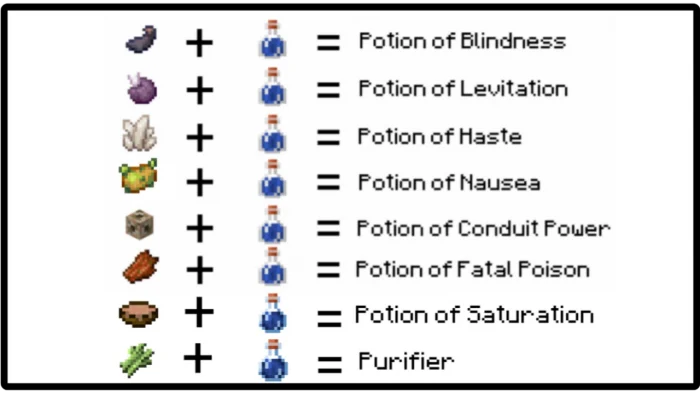
To brew potions+ as usual we need water bottle and will combine it to nether wart to form an awkward potion. As usual awkward potion is the base potion we need in brewing different effect potions.
There are 8 different potions added in this addon
Potion of Blindness Potion of Conduit Power Potion of Fatal Poison Potion of Haste Potion of Levitation Potion of Nausea Potion of Saturation Purifier – Use to remove all negative effects including levitation effect
Potion+ screenshots

How to install Potion+
- Download the .mcaddon file using the button on this page.
- Open the downloaded file with Minecraft Bedrock Edition.
- Wait for Minecraft to confirm that the import has completed.
- Activate the imported pack in the world settings.
- Back up important worlds before installing community content.
Download Potion+ (1.16, 1.17) Magic for free
Preparing your download…
If the download did not start automatically, click here.


