
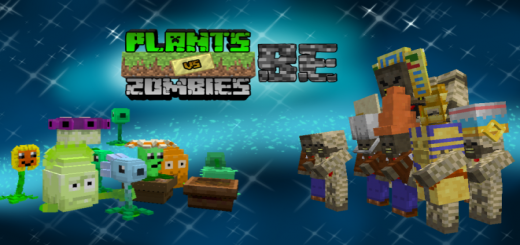
About Plants VS Zombies Bedrock
- Activate all experimental games
Plants VS Zombies bedrock, it's a add-on that added the plants of the plants VS Zombies game, the add-on count with a variety of plants to choice and many features from enjoy the addon
For start to use the add-on, you need to find the next mob: Crazy Dave
Crazy Dave appears randomly in your world's, this npc trades you plant seeds an other items importantes to the add-on
If he take damage, he will spawn one plant.
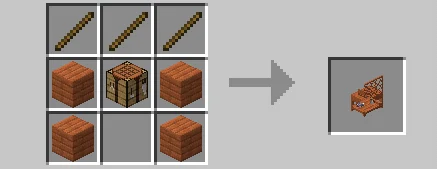
To continue with the add-on, you need to craft a new crafting table: Garden Table
From craft the garden table you need 3 sticks, one crafting table and 4 acacia planks
Now, whit this table we can see the next features
Next, in this garden table you can craft your first plant: Wooden pot
The wooden pot it's a block that allows you to create plants You can find the wooden pot like a seed packet in the nature inventory Recipe:
You need the Garden table to create the wooden pot seeds
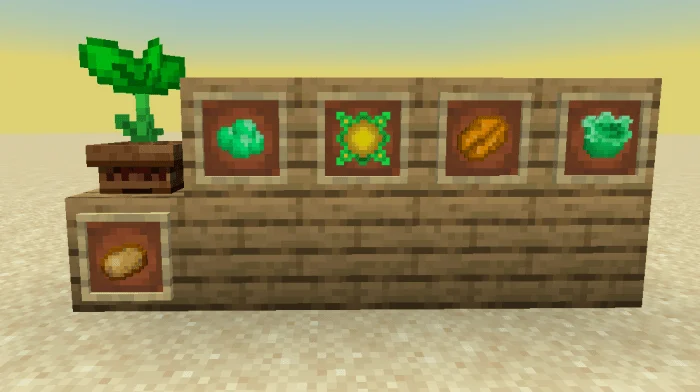
With this pot you can put your second plant:Sprout
The sprout it's a plant that can grow in a basical plants You can obtain the sprout with Crazy Dave You can use the next items to create the basical plants:
Peas: If you give peas to a sprout, you can obtain a peashooter. You can obtain peas trading with Dave cabbage: If you give a cabbage to a sprout, you can obtain a cabagge pult. You can obtain cabbages trading with Dave wallnut: If you give a wallnut to a sprout, you can obtain a wall-nut. You can obtain wallnuts trading with Dave Potato: If you give a potato to a sprout, you can obtain a potato mine. You can obtain potatoes in villages Solar fruit: If you give a solar fruit to a sprout, you can obtain a sunflower. You can obtain solar fruits trading with a Wandering Trader This plant allows you create the basical plants.
Plants VS Zombies Bedrock screenshots




How to install Plants VS Zombies Bedrock
- Download the .mcaddon file using the button on this page.
- Open the downloaded file with Minecraft Bedrock Edition.
- Wait for Minecraft to confirm that the import has completed.
- Activate the imported pack in the world settings.
- Back up important worlds before installing community content.
Download Plants VS Zombies Bedrock (1.17) Mobs for free


