
About MultiplayerTanks
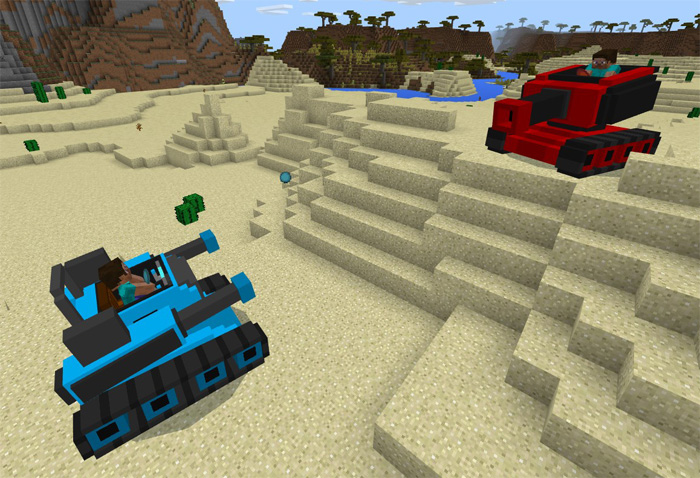
This add-on implements two new army tanks to Minecraft which are meant to use for multiplayer gameplay. You can sit down on a tank and drive around, but also shoot rockets at your fellow Minecraft players or hostile mobs you come across in your game. This is really a must download for anyone who want to take PvP to the next level with some real fire power.
Creator: MyoHtet
How does it work? There are two different tanks and each of them can be used in a similar way. Once seated on any of the tanks you’ll be able to control it by moving around normally and by jumping.
iOS / Android: Long press on the tank and press Ride or Drive Windows 10: Right-click on the tank to ride it
This add-on is perfect for multiplayer as it adds tanks in two complete different colors. It also replaces two items in-game with explosives which you can throw at your enemy, preferably when seated on a tank as it’s meant to simulate the rocket launcher on the tank.
Each tank work a little bit different from the other.
BlueTank Advantage: Faster driving Disadvantage: Weaker rocket launcher RedTank Advantage: More powerful rocket launcher Disadvantage: Slower driving
General Tank Features
RedTank Replaces Stray Health: 100 full hearts Can jump Fire resistance Heavy tank, slow driving but powerful cannon. RedShells (replaces Ender Pearl) are items which RedTank riders can shoot. BlueTank Replaces Wither Skeleton Health: 100 hearts Can jump Fire resistance BlueTank is a lighter tank, faster driving. BlueShell (replaces Snowballs) are items which BlueTank riders can shoot.
How to install MultiplayerTanks
- Download the .mcpack file using the button on this page.
- Open the downloaded file with Minecraft Bedrock Edition.
- Wait for Minecraft to confirm that the import has completed.
- Activate the imported pack in the world settings.
- Back up important worlds before installing community content.
Download MultiplayerTanks Weapon for free


