

About Mounts Whistle
Created By ZhyuRo – Kun ⚠️Turn on experiments in map settings!
Have you ever Lost your mount/Left them far from you? This Addon is the Solution!
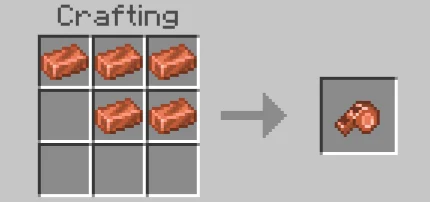
How to Use it? After you crafted the item:
- Tame a Mount, it can be either:
◆ Horse [Tamed first] ◆ Donkey [Attach a Chest first] ◆ Mule [Attach a Chest first] ◆ Llama [Attach a Chest first] ◆ Strider [Attach a Saddle first] ◆ Camel [Tamed first]
- Sneak + Interact the mount while Holding the Whistle item
- Move away from the mount
Then Interact [Tap & Hold/Right-Click] the Whistle & the mount will be teleported to your location
Mounts Whistle screenshots
How to install Mounts Whistle
- Download the .mcaddon file using the button on this page.
- Open the downloaded file with Minecraft Bedrock Edition.
- Wait for Minecraft to confirm that the import has completed.
- Activate the imported pack in the world settings.
- Back up important worlds before installing community content.
Download Mounts Whistle (1.20) Mobs for free
Preparing your download…
If the download did not start automatically, click here.


