
About More Prismarine Blocks Add-on
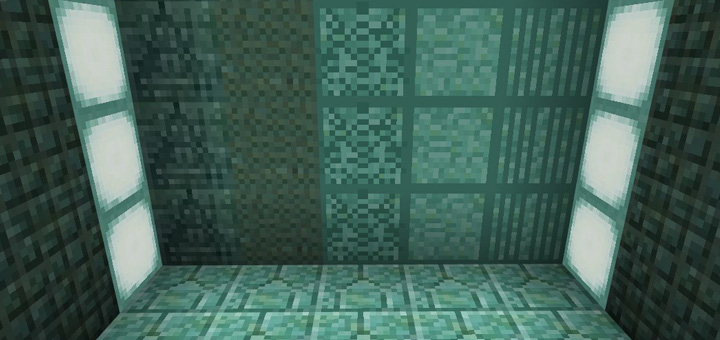
This add-on adds five new Prismarine blocks to the game which are wonderful to use for decorating your in-game creations. The great benefit is that neither of them replace any vanilla blocks. But there is an obvious downside and that is that they can only be obtained by using text commands. But as a whole it’s a really cool addition!
Creator: Jason Metch
How does it work? To obtain the blocks you will need to use the following text command: /give @p prismarine 64 <insert-ID>
There are five new Prismarine blocks which you can get and here are the names and IDs for each block.
Prismarine Eye (ID: 3) Prismarine Sand (ID: 4) Prismarine Carved (ID: 5) Prismarine Stone (ID: 6) Prismarine Pillar (ID: 7) For example, if I wanted to get some Prismarine Stones then I would need to type the following text command: /give @p prismarine 64 6
How to install More Prismarine Blocks Add-on
- Download the .mcpack file using the button on this page.
- Open the downloaded file with Minecraft Bedrock Edition.
- Wait for Minecraft to confirm that the import has completed.
- Activate the imported pack in the world settings.
- Back up important worlds before installing community content.
Download More Prismarine Blocks Add-on Cosmetic for free


