
About More Potions
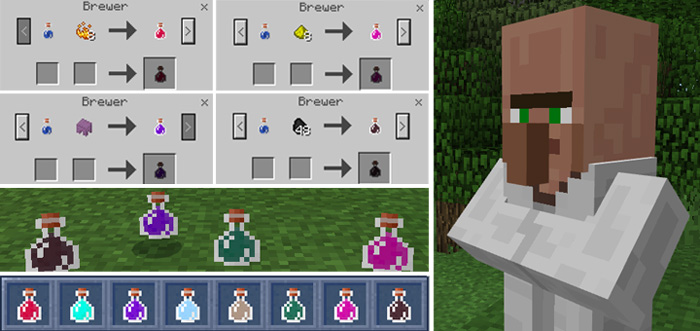
This is the first addon to ever introduce custom consumable items! The potions work similar to the normal potions as they will give the player a status effect for a certain duration of time. Discover 8 brand unique and brand new potions all sold by a new type of villager: The Brewer!
Creator: solvedDev
The Potions You consume a custom potion by holding it. While you have an active custom potion effect on you, you cannot apply another effect. You can however refresh the duration of the effect by consuming the same potion a second time. After consuming a potion, it turns into a empty bottle (due to a MCBE bug the inventory doesn\’t update correctly, clicking a block fixes it).
Health Boost Potion (Duration: 120s | Effect: +20 hearts | Data value: yellow_flower:1) Super Speed Potion (Duration: 20s | Effect: +0.4 speed | Data value: yellow_flower:2) Gravity Potion (Duration: 20s | Effect: no gravity | Data value: yellow_flower:3) Feather Potion (Duration: 120s | Effect: no fall damage | Data value: yellow_flower:4) Knockback Potion (Duration: 60s | Effect: no knockback | Data value: yellow_flower:5) Attack Damage Potion (Duration: 10s | Effect: +7 damage | Data value: yellow_flower:6) Magic Potion (Duration: 60s | Effect: no damage through potions | Data value: yellow_flower:7) Wither Potion (Duration: 60s | Effect: no wither effect damage | Data value: yellow_flower:8)
The Villager You can create the new brewer villager by giving a cauldron to a villager. Make sure to not open his trading inventory before the transformation, otherwise you are going to loose some trades. This villager sells the new potions for survival usage.
How to install More Potions
- Download the .mcpack file using the button on this page.
- Open the downloaded file with Minecraft Bedrock Edition.
- Wait for Minecraft to confirm that the import has completed.
- Activate the imported pack in the world settings.
- Back up important worlds before installing community content.
Download More Potions Addons for free


