
About Modern Tools Add-on
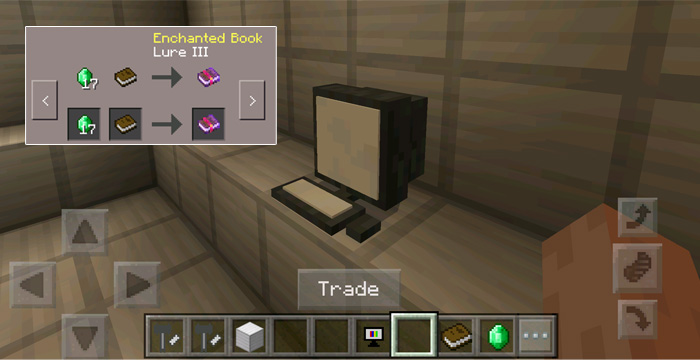
This addon brings 6 modern tools to Minecraft Pocket Edition and they replace just the shulker mob. For example, one of the tools is a computer which you can use to browse MineBay and another tool lets you cook your raw food items in an instant on a kitchen stove. Besides using them for their various tasks you can also use them for decorating your worlds as they are essentially new types of furniture.
Creator: Kiritocris55
How does it work? To create a modern tool you will first need to find a forge. The forge is an item which is dropped mostly everywhere in the Overworld (since it replaces eggs and eggs are dropped by chickens). Place down a forge on the ground (by throwing the item) and then use any of the following items to build a modern tool.
PC (Mine Bay) – Ink Sac Fridge – Gray Dye Tables – Bone Meal, Light Blue Dye, Rose Red, Lapis Lazuli, Pink Dye, Cocoa Beans Kitchen – Light Gray Dye PC (Mine Bay) – Ink Sac: Use the computer to access Mine Bay. Here you can buy and sell all kinds of different items.
Fridge – Gray Dye: A storage container with 27 available slots.
Tables/Chairs – Bone Meal, Light Blue Dye,Rose Red, Lapis Lazuli, Pink Dye, Cocoa Beans: Decorate your home with some nice furniture. You can even sit on the chairs.
Kitchen Stove – Light Gray Dye: Cook food instantly. This will work for the following raw items: chicken, beef, pork chop, rabbit meat.
Forge (default): Add coal to the forge and retrieve a random valuable item (diamond, gold, gold nugget or iron ingot).
Installation This add-on requires the beta version (1.0.4.1) of Minecraft Pocket Edition.
How to install Modern Tools Add-on
- Download the .mcpack file using the button on this page.
- Open the downloaded file with Minecraft Bedrock Edition.
- Wait for Minecraft to confirm that the import has completed.
- Activate the imported pack in the world settings.
- Back up important worlds before installing community content.
Download Modern Tools Add-on Cosmetic for free


