
About Minecraft Story Mode S2
Minecraft: Story Mode is basically a point-and-click adventure game which is based on Minecraft but with a more in-depth story. A few episodes are already out and in them we’re introduced to a whole bunch of new characters. This add-on takes most of those characters and introduces them to the Minecraft (Bedrock Edition).
Creator: StarkTMA
New Mobs Creeder (replaces Spiders): Similar to ordinary spiders in that sense that they can climb walls. However, one additional feature is their special attack which allows them to jump on top of your head and explode. They have twice as much health than a normal creeper.
Large Henry and Big Hank (replaces the Wither Skeleton and Stray): These are two different mobs. Their models look about the same but they have slightly different textures. Both of them are naturally hostile and cause a nausea effect on their targets.
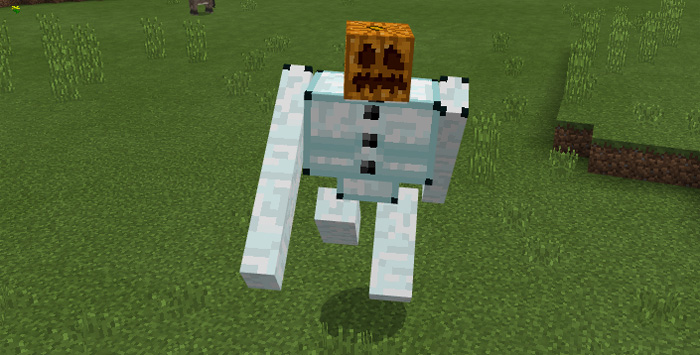
Ice Iron Golem (replaces Iron Golems): The Ice Iron Golem throw snowballs at their enemies and they are also immune against snowballs themselves.
Romeo (replaces Skeleton): Romeo will constantly fly around and shoot fireballs at his targets. He also has the ability to summon the Prismarine Colussus, the 3 Headed Ghast or the Snow Admin.
A good challenge is to try to kill him without the use of a fully enchanted diamond armor. It’s definitely going to be hard!
If you do manage to kill him then he will drop the Primarine Gauntlet. This is a wearable item which will give you some extra health and strength when wearing it.
Snow Admin (replaces Snow Golems): This mob is hostile but not very dangerous.
Prismarine Colussus (replaces Zombie): This is the giant version of Romeo. It’s incredibly dangerous and it also has the ability to summon the Prismarine Foes.
(Thanks to Julien who allowed StarkTMA to edit the model and use it for his add-on.)
Prismarine Foes (replaces Vindicator): They are hostile and will chase you down. Run is the best advice, really! If you do kill one then it drops Structure Blocks.
Anthony The Warden (replaces Zombie Pigman): The one (and maybe only) friendly new mob included in this add-on. If he dies then he will drop some cookies.
OxBlood (replaces Creepers): This big and bulky creature is friendly towards everyone. But just remember to not make him angry.. if you do.. then it’s a good chance he’ll smash you!
Lluna (replaces Llamas): Everyone’s favorite character, and especially Gara’s. There are two different variations of Lluna. One normal and one wearing a nice outfit with a hat and scarf.
Nurm (replaces Villagers): This is the cartographer villager from Minecraft Story Mode. There are actually two variants of Nurm. The other one wears a yellow jacket.
3 Headed Ghast (replaces Ghast): This is the most dangerous mob included in the add-on. It is hostile towards players and has the ability to spawn up to 15 minion ghasts as well as shooting fireballs.
Ghast (replacex Vex): Similar behaviors to a normal ghast.
RedSlime (replaces Slime): Both faster and stronger than a normal slime.
Zombie Miner (replaces Husk): Similar to an ordinary zombie. It drops coals, iron and diamonds.
Ice Ender Creeper (replaces Enderman): This mob is a combination of a creeper and an enderman. The result is obviously something terrifying. It will teleport around and unexpectedly detonate and blow up. No armor will protect you against this monster!
Notes from StarkTMA
Mobs Have different Spawn eggs texture and Names so you can tell Most mobs have Different Drops Don’t just kill Mobs, Let them Hit and Kill You so you can see their abilities Thanks Once Again to Julien for his Prismarine colossus Model This Addon Will get updates whenever MCSM S2 Recieve a new Episode with New Mobs If I have no place to create new mobs, I’ll release it as a 2nd Part, But you won’t ba able to use both Parts at the same time
How to install Minecraft Story Mode S2
- Download the .mcpack file using the button on this page.
- Open the downloaded file with Minecraft Bedrock Edition.
- Wait for Minecraft to confirm that the import has completed.
- Activate the imported pack in the world settings.
- Back up important worlds before installing community content.
Download Minecraft Story Mode S2 Mobs for free


