
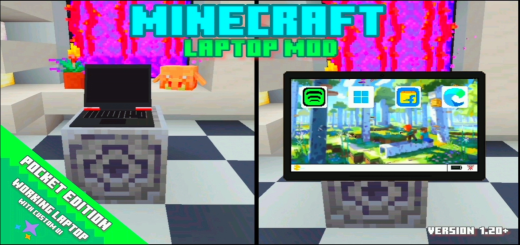
About Laptop with Custom UI Screen
Created By Adarsh Gamer
⚠️Turn on experiments in map settings!
In minecraft pe version 1.20+ new workable laptop addons with custom UI screen. In this addons you get a working laptop!
Laptop application
- Music app
- Window11 app
- Shopping app
- Brower app
Music App In music app there are 3 type of music
- Love (3 songs)
- Cool (3 songs)
- Favourite (2 songs)
Window11 App
- Game (You can play games)
- Setting
- OFF your laptop
Shopping App (In shopphing app you can buy items) There are two buying system
- Free items
- Buy item (Using emerald)
Brower App (The brower app is not complete)
How to install Laptop with Custom UI Screen
- Download the .mcaddon file using the button on this page.
- Open the downloaded file with Minecraft Bedrock Edition.
- Wait for Minecraft to confirm that the import has completed.
- Activate the imported pack in the world settings.
- Back up important worlds before installing community content.
Download Laptop with Custom UI Screen (1.20) Furniture for free
Preparing your download…
If the download did not start automatically, click here.


