
About Industrial Machinery
Created by By Fluffyalien1422
- Turn on "Holiday Creator Features" and "Additional Modding Capabilities" In the world settings
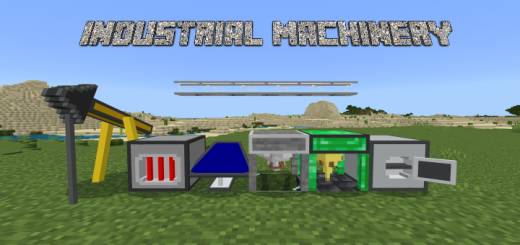
This addon adds 15+ machines, including Drills, Oil Generators, Solar Panels, Quantum Quarry, Redstone Furnace, Pulverizer, and much more. All machines require a certain amount of power which is transferred to and from machines via a Power Distributor. The power in this addon is measured in FF (FluffyFuels).
Machines Item Pipe: Transfers items, can rotate, connect to other pipelines, and move vertically. Machines can accept items via these pipes Item Sorter: Filters items. Choose between a specific item or a group of items to filter Power Distributor: Transfers power to and from machines within a 35 block radius. Interact to view stored power Drill Lv. 1 – -50 FF/10s: Mines a block under it every 10s Drill Lv. 2 – -50 FF/8s: Mines a block under it every 8s Drill Lv. 3 – -50 FF/6s: Mines a block under it every 6s Drill Lv. 4 – -50 FF/4s: Mines a block under it every 4s Quantum Quarry – -50 FF/10s: Generates a random ore every 10s Basic Oil Generator – +80 FF/10s: Generates FF passively Advanced Oil Generator – +120 FF/10s: Generates FF passively Pulverizer – -80 FF/item: Duplicates and turns raw ores into pulverized ores Redstone Furnace – -20 FF/item: Instantly cooks items, only cooks items that smokers and blast furnaces can cook (food, ores) Solar Panel Lv. 1 – +15 FF/5s: Generates FF passively Solar Panel Lv. 2 – +25 FF/5s: Generates FF passively Solar Panel Lv. 3 – +35 FF/5s: Generates FF passively Solar Panel Lv. 4 – +45 FF/5s: Generates FF passively
Industrial Machinery screenshots

How to install Industrial Machinery
- Download the .mcaddon file using the button on this page.
- Open the downloaded file with Minecraft Bedrock Edition.
- Wait for Minecraft to confirm that the import has completed.
- Activate the imported pack in the world settings.
- Back up important worlds before installing community content.
Download Industrial Machinery (1.17) Technology for free


