
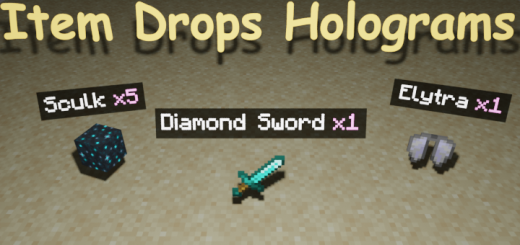
About Holograms on Dropped Items
Turn on experimental options in map settings!
Above each dropped item is shown text-hologram, which displays the name of the item and the amount! Now you can clearly identify the item from afar without looking at its texture!
- After applying the addon, only new dropped items will have holograms. Items that were dropped before the addon was applied will not get holograms.
- Multiplayer is supported
- Just enter this command /function itemsHolograms_config and you will open the settings window for this addon
- Enable addon. Allows you to turn the addon on and off without leaving the world.
- Reduce hologram font size. If enabled, the font size in the holograms will be smaller.
- Raycasting. If disabled, holograms will be displayed even on items that you cannot see (behind the block, in the grass, etc.)
- On which items the hologram will be displayed. You can choose "Nearest items" or "Items the crosshair is aimed at"
Available options in "nearest" mode
- Limit the number of closest items with holograms to. You can enter any integer. The default is 10. Enter 0 for unlimited (not recommended)
- Maximum distance to the item to display the hologram. You can enter any integer. The default is 12. A maximum of 50 is recommended.
- In "crosshair" mode, holograms are displayed only on items that your crosshair is aimed at.
- Changing the hologram pattern (Enter the command /function itemsHolograms_config and scroll to the bottom)
Holograms on Dropped Items screenshots


How to install Holograms on Dropped Items
- Download the .mcaddon file using the button on this page.
- Open the downloaded file with Minecraft Bedrock Edition.
- Wait for Minecraft to confirm that the import has completed.
- Activate the imported pack in the world settings.
- Back up important worlds before installing community content.
Creator: sirоb
Download Holograms on Dropped Items (1.20) Tools for free
Preparing your download…
If the download did not start automatically, click here.


