
About Flags Addon
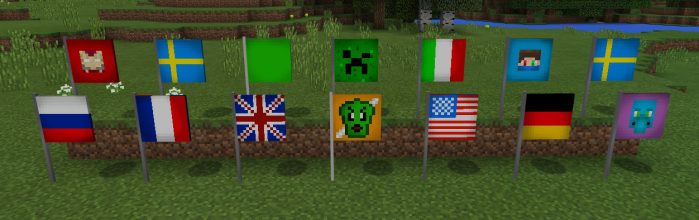
This addon brings a bunch of flags to the game. It is the shulker which is replaced and as a result you might find some random flags spawning in the End. The flags can also be spawned in creative mode in the Overworld and they are great to use as decorations. But since there are just 16 dyes there is also a limited amount of flag types.
Creator: JPlaysPE
How does it work? The shulker is replaced by a blank canvas flag. It’s easiest to use a spawn egg to spawn some flags (also known as shulkers). You can use any of the existing dyes to turn it into a normal flags. Most of them are country flags but there are also some based on avatars.
iOS / Android: Hold any type of dye and long press on a flag to change it Windows 10: Right-click on a flag while holding a dye to change it
That’s one small step for [a] man, one giant leap for mankind. – Neil Armstrong, The Moon Landing, 20 July, 1969. (Sorry, couldn’t help myself!)
How to install Flags Addon
- Download the .mcpack file using the button on this page.
- Open the downloaded file with Minecraft Bedrock Edition.
- Wait for Minecraft to confirm that the import has completed.
- Activate the imported pack in the world settings.
- Back up important worlds before installing community content.
Download Flags Addon Cosmetic for free


