
About Ferrari LaFerrari
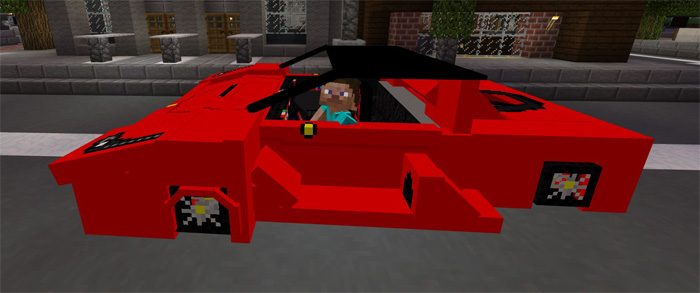
This add-on replaces the witch in-game with a fully functional sports car. It’s basically quite simplified Minecraft version of the LaFerrari (by Ferrari). If you’re looking for a high-end sports car then look no further. This car is one of the most luxurious vehicles so far introduced in the Bedrock Edition. It does have some downsides though such as the small hitbox.
Creator: Fernancraft277998
How to drive the sports car? To drive the vehicle you’ll first need to spawn it. And since it replaces witches you either has to search for it in swamp biomes or using a spawn egg to spawn it. Search for “Ferrari” in your creative inventory and it will appear among the different items.
Find the shadow in front of the vehicle. This is the hitbox of the car and the area you’ll need to click or press on in order to enter it.
Android / iOS: Long press on the shadow and press Drive to ride the vehicle Windows 10: Right-click on the shadow to enter the vehicle Hold a carrot on a stick to start driving the car.
It’s an incredibly detailed model and it does seem to include most shapes and curves of the original car model.
The interior inside the car is also very detailed with details such as a steering wheel and seats.
How to install Ferrari LaFerrari
- Download the .mcpack file using the button on this page.
- Open the downloaded file with Minecraft Bedrock Edition.
- Wait for Minecraft to confirm that the import has completed.
- Activate the imported pack in the world settings.
- Back up important worlds before installing community content.
Download Ferrari LaFerrari Transport for free


