
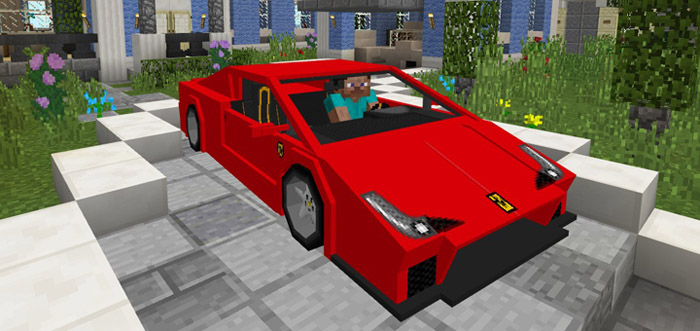
About Ferrari 458 Italia Add-on
Get yourself one of the best looking cars on the market in the Minecraft universe. This add-on replaces one of the mobs in-game with a Ferrari 458 Italia which is a mid-engined Italian sports car. It’s much faster than any donkey or horse can run so there’s really no reason why you wouldn’t like this car upgrade. It’s a really well designed vehicle with lots of nice details (and especially the screen on the dashboard).
Creator: Gona
How to drive the car? The car have two seats but it’s only one player which can drive it at a time. You enter the car similar to riding a horse.
iOS / Android: Long press on the vehicle and press Drive Windows 10: Right-click on the vehicle to enter it
Hold a key (carrot on a stick) in your hand to start driving and then point in the direction which you want to go.
The car also got 27 available slots which can be used for storage.
How to install Ferrari 458 Italia Add-on
- Download the .mcpack file using the button on this page.
- Open the downloaded file with Minecraft Bedrock Edition.
- Wait for Minecraft to confirm that the import has completed.
- Activate the imported pack in the world settings.
- Back up important worlds before installing community content.
Download Ferrari 458 Italia Add-on Transport for free


