
About Color Blocks
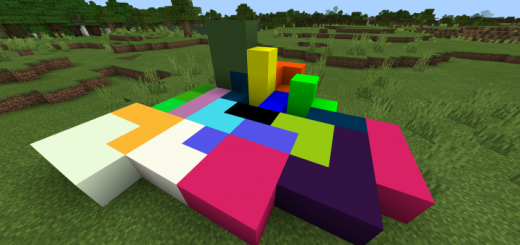
Do you have the color you want in Minecraft? Let’s add Color Blocks Addon in such a case! This addon can add colorful 4096 colored blocks to the world of Minecraft.
Blocks The color of the block is indicated on the ID and block name.
The block Red,Green,Blue (00 – ff) of for each 16 phases, 4,096 (16x16x16) add a block.(Light version is 216 blocks.)
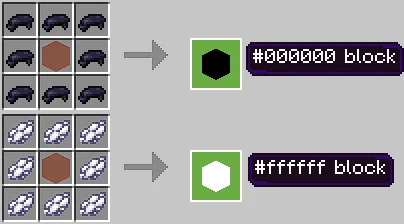
Craft Crafting cobble stones and obsidian can make “#000000 block”.
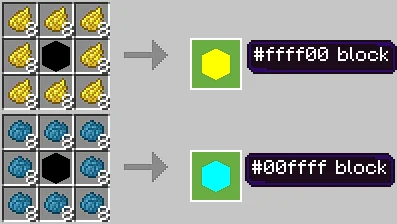
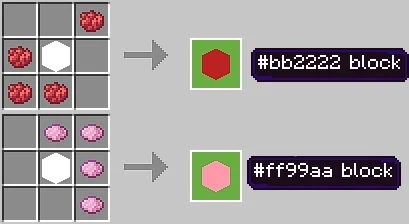
To create each color block, you can increase the color level by using red dye, or green dye, blue dye and white dye.
Also, crafting with 8 white dyes results in “#000000 block”. Crafting with 8 black dyes will result in “#ffffff block”.
“#000000 block” has a shortcut recipe that allows you to skip stages with color blocks and 8 dyes (Useable dyes: red, green, blue, cyan, yellow, magenta).
“#ffffff block” can make a color block similar to colored wool with 4 dyes.
Notes Because a huge number of blocks are added, it may not work properly or may be slow depending on your environment.
Color Blocks screenshots

How to install Color Blocks
- Download the .mcaddon file using the button on this page.
- Open the downloaded file with Minecraft Bedrock Edition.
- Wait for Minecraft to confirm that the import has completed.
- Activate the imported pack in the world settings.
- Back up important worlds before installing community content.
Download Color Blocks (1.16) for free


