
About Cinematic Cameras
Have you ever wanted a tool that you can use to create cinematic scenes? You’re in luck! This function pack/addon uses commands to add up to 4 billion cinematic scenes that you can use in whatever way you’d like!
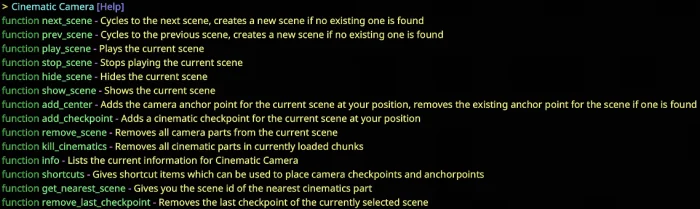
This pack comes with plenty of commands that can be used to manipulate your cinematics.
function next_scene and function prev_scene These commands are used to cycle through and create new scenes.
function play_scene This command is used to play the current camera scene on the player the command is run as.
function stop_scene This command is used to stop all playing camera scenes.
function show_scene and function hide_scene Used to show and hide the particles on the selected scene.
function info Displays the selected scene number, camera speed and number of checkpoints in the current scene.
function shortcuts Gives spawn eggs that can be used as shortcuts to place checkpoints and anchorpoints.
function remove_last_checkpoint Removes the last checkpoint placed in the selected scene.
Cinematic Cameras screenshots
How to install Cinematic Cameras
- Download the .mcpack file using the button on this page.
- Open the downloaded file with Minecraft Bedrock Edition.
- Wait for Minecraft to confirm that the import has completed.
- Activate the imported pack in the world settings.
- Back up important worlds before installing community content.
Download Cinematic Cameras (1.16) Gameplay for free


