
About Castle War
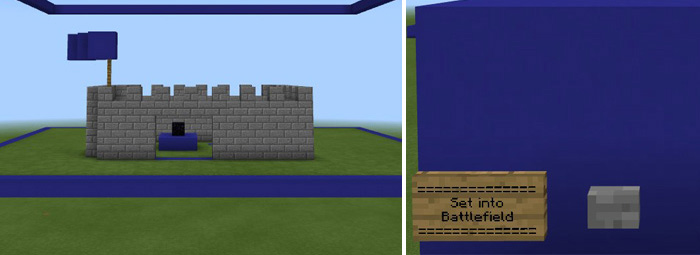
Castle Wars is a multiplayer map where you have to build a castle and then defend it against the other team. It’s a really fun mix of gameplay where you’ll start out building a castle and then fight to protect it in a battle. The main objective for both teams are to protect an obsidian block. The team which first loses its obsidian block has lost the game. Make sure to read through the instructions in-game. Creator: jackalot How to play? Since this a PvP multiplayer map it requires at least two players but preferably more. Each team will start out by building a castle. The design of the castle be any way you like as long as it’s built within the assigned borders. Another requirement is that there must be a clear path to an obsidian block placed somewhere at the castle. Press Set into Battlefield once you have completed the build and then press the second button to get back to spawn.
At spawn you will be able to use another button to teleport to the Castle Wars arena.
The objective is to mine the other team’s obsidian block or defeat all of their team members. If killed during a battle you are not allowed to respawn until the game is over.
How to install Castle War
- Download the .zip file using the button on this page.
- Open the downloaded file with Minecraft Bedrock Edition.
- Wait for Minecraft to confirm that the import has completed.
- Select the imported world from the Minecraft world list.
- Back up important worlds before installing community content.
Download Castle War Pvp for free


