
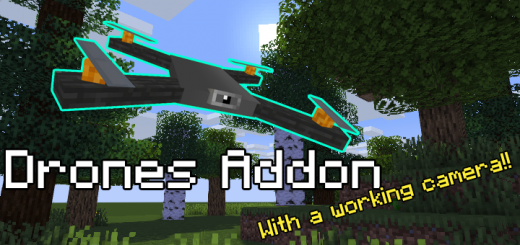
About Camera Drone
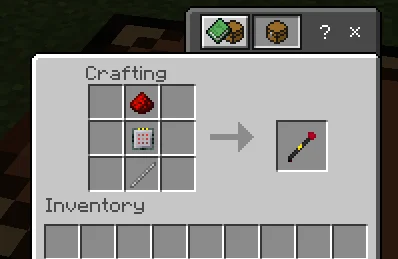
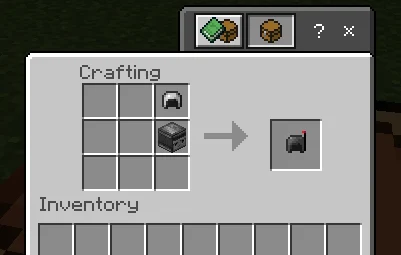
This addon will add a craftable drone to the game which once installed and powered up, will protect it's owner from monsters, and the mobs who are your enemies. Once you will setup the drone using the Drone Installation kit (Crafting given below) it won't do anything other than sitting on the ground. You will be needed to power it up by feeding-in a Redstone Block. Once powered up, it would start to move around, don't worry, it would still stay in a 20 block radius to you, if it moves away that radius, it would get teleported to you or will follow you.
Simply type >> /function info_drone << in chatbox to get a whole list of what it can do
Camera Drone screenshots
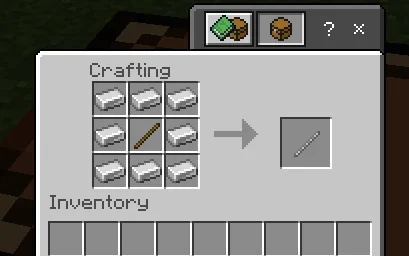
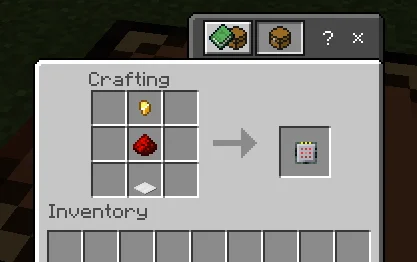
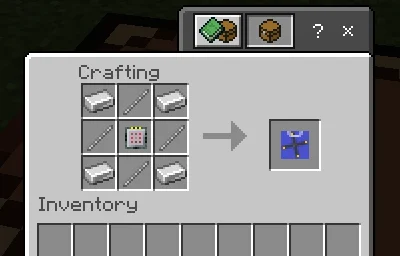
How to install Camera Drone
- Download the .mcaddon file using the button on this page.
- Open the downloaded file with Minecraft Bedrock Edition.
- Wait for Minecraft to confirm that the import has completed.
- Activate the imported pack in the world settings.
- Back up important worlds before installing community content.
Download Camera Drone (1.16) Tools for free
Preparing your download…
If the download did not start automatically, click here.


