
About Block Entity
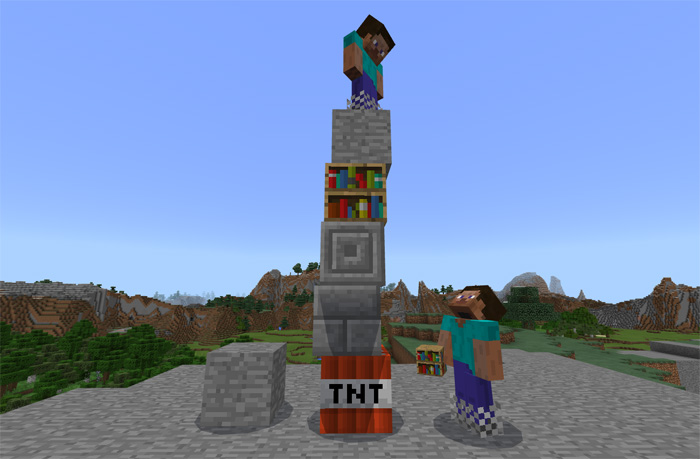
This add-on replaces the Zombie Villager with a block entity. A block entity is basically a block which behaves similar to a mob except that it can be used as a more fluid building block. You can push it around, change its size and skin as well as other things. It’s actually more realistic than the normal blocks as it is affected by gravity which isn’t the case for most normal blocks.
Creator: tatsuki mcpe
How does it work? Spawning Use a spawn egg or a text command (/summon zombie_villager) to spawn the block entity. The entity is shaped as a block and you can stand on top of them or stack more block entities on top of them.
Block Skin The default block entity skin is stone. To change the skin of a block entity you will need to wear chainmail boots and use any of the following block items on the block entity:
Stone Stone Brick Chiseled Stone Brick Bookshelf TNT
Changing Other Behaviors Size: Wear chainmail boots and use a Nether Star on the block entity. Stackable: Wear chainmail boots and use a diamond to change their stacking ability. Harm/Health: Wear chainmail boots and use an iron ingot/gold ingot to switch between being able to harm it or not. Kill: Use the following text command to kill them. /kill @e[type=zombie_villager]
How to install Block Entity
- Download the .mcpack file using the button on this page.
- Open the downloaded file with Minecraft Bedrock Edition.
- Wait for Minecraft to confirm that the import has completed.
- Activate the imported pack in the world settings.
- Back up important worlds before installing community content.
Download Block Entity Cosmetic for free


