
About Autocompletion Addon
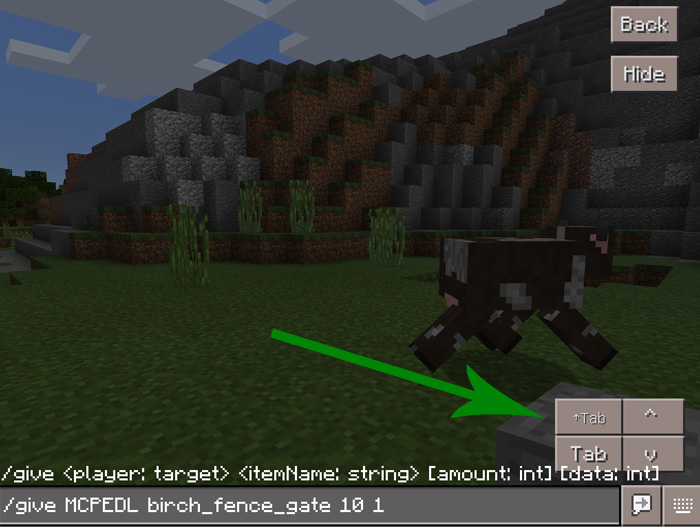
This addon implements four new buttons to the chat user interface for Minecraft Pocket Edition which makes typing both commands and normal sentences much easier. All of the added features are ones which already exist for the PC versions of Minecraft, but for unknown reasons haven’t been ported to Pocket Edition yet.
Creator: RandomityGuy
How does it work? By using this addon you will be able to select previously typed commands, autocomplete words as well as using a few other nifty features. Open the text chat window to start using the new features.
Shift + Tab Key (↑Tab): Use this button to switch between multiple options (e.g. if you write birch then you can use this button to switch between birch_door, birch_fence_gate and so on) Tab Key: Autocomplete certain commands/words, e.g. /give MCPEDL birch_f then press Tab Key to autocomplete it Previous Key (^): Select previous command(s) written Next Key (v): If you missed the command you wanted to type while rapid touching previous key then you can use this button.
Known Issues Pressing any of the new buttons will close the keyboard window.
How to install Autocompletion Addon
- Download the .mcpack file using the button on this page.
- Open the downloaded file with Minecraft Bedrock Edition.
- Wait for Minecraft to confirm that the import has completed.
- Activate the imported pack in the world settings.
- Back up important worlds before installing community content.
Download Autocompletion Addon for free


