
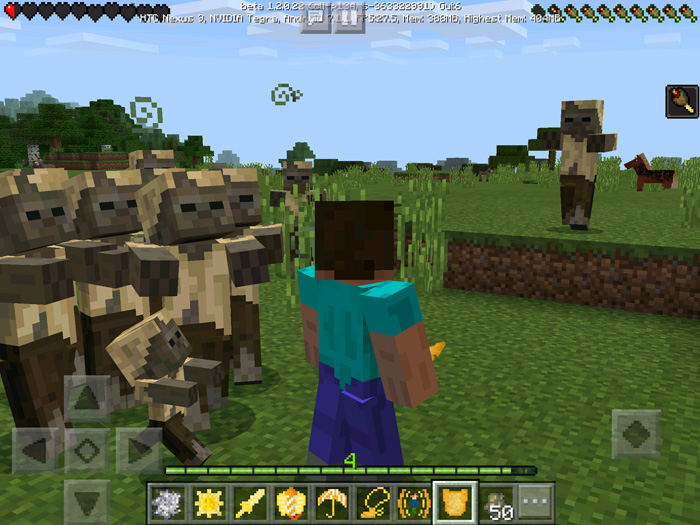
About Astronomic Expansion Addon
This is the first addon to implement customized behaviors for eight new items in-game. Most of the items enable some kind of extra ability. For example, the Panic Necklace will give you an incredible speed boost and the Elytra Starter will boost you up into the sky towards the stars. A great thing is that neither of the new items replace any vanilla items!
Creator: solvedDev Updated: 3 September, 2017 (read changelog)
How to obtain the new items? The Astronomic Items can be obtained by trading with an Astronomer or the Magician. They are new villager types which can be found spawning in villages. They are dressed the same way as a Cleric.
You can also use the following text chat command to obtain the items: /give @p yellow_flower 1 [1-8]
List of New Items & Behaviors
All of the following items are sold by the Astronomer. Most of the new items provide the player a new ability while holding it.
Astronomic Items (Astronomer Villager) Star Powder – The Astronomer can craft multiple of them into a Fallen Star. It can be used on zombies to turn them into Galactic Zombie bosses. Fallen Star – Base ingredient for all other items. Star Sword – Deals 10 attack damage and boosts your health and speed. Shield – You can’t die while holding this item. However, you’re speed is drastically decreased. Umbrella – Reduces your gravity while holding it. This means you won’t die from fall damage. Fire Amulet – Immune to fire damage while holding it. Elytra Starter – Launcher you into the air if you jump while holding it. Switch to another item to stop the boost. Panic Necklace – Speed boost while holding it. Magic Items (Magician Villager) Vampire Potion – Hold the item in your hand when it’s night to turn into a vampire! (+3 hearts, +2 damage, increased speed) Werewolf Potion – Hold the item in your hand during the night to turn into a werewolf! (Night: +5 hearts, +4 attack damage, increased speed & saturation. Day: -2 hearts) There is no way to undo your transformations (e.g. werewolf or vampire) at the moment.
Here I first used the Elytra Starter to boost myself up into the air. I then switched to the Umbrella item to fall safely down to the ground.
The Panic Necklace is extremely useful if you need a quick escape as it will greatly increase your speed while holding it.
The Shield will make you invincible to all damage. Actually, I died after 10-15 seconds of them attacking me. But it did help keep me alive longer than otherwise possible.
The Magician sells Empty Extract Bottles. Use them on bats or wolves to extract their life essence. Then kill a bat or a wolf to obtain a Vampire Tooth or a Wolf Fell. You can then trade these items with a Magician to obtain a Vampire Potion or a Werewolf Potion.
Hold the Vampire Potion or the Werewolf Potion when it’s night to turn into either creatures (or rather gain powers/abilities which relate to them).
Vampire Potion – Hold the item in your hand when it’s night to turn into a vampire! (+3 hearts, +2 damage, increased speed) Werewolf Potion – Hold the item in your hand during the night to turn into a werewolf! (Night: +5 hearts, +4 attack damage, increased speed & saturation. Day: -2 hearts)
Other Useful Info
Use an Empty Extract Bottle to capture the Life Essence of wolves and bats Give a villager a Star Flower to turn him into an Astronomer Give a villager Star Powder to turn him into a Magician Polar Bears drop Polar Bear Fell Ocelots drop Ocelot Fell Vindicators drop Corrupted Souls Baby Zombies drop Corrupted Flesh Endermen drop Corrupted Hearts Fiery Potion – Trade this item in combination of Corrupted Souls, Corrupted Flesh OR Corrupted Hearts to craft a Sword Effect Pigmen (available: damage, health, speed) A weaponsmith sells bonus items which you can get by trading a lot with him: Steel Ingots (random number of iron ingots and Fiery Potion) Diamond Hammer (2 sticks & 4 diamonds) Steel Hammer (2 sticks & 4 Steel Ingots) Star Hammer (2 sticks & 4 Fallen Stars) Steel Sword (1 stick & 2 Steel Ingots) Emerald Sword (1 stick & 2 emeralds) Important: Please note: All Villager transformations should be done before you open his trading inventory for the first time, otherwise you won’t have access to his first trades Mob drops might be broken in the 1.2 beta which leads to this feature not fully working Notes from the creator (solvedDev):
I am tricking the game in order to add these new items. You might experience bugs or unexpected behavior. I will try my best to fix them but some stuff won’t be possible to fix.
This addon isn’t ready yet: It’s still in development. I’ve planned the addition of more mobs & blocks through this addon in the future.
How this works
All items are retextured & renamed flowers. This means you can place them down in flower pots, on grass or dirt. The very difficult thing to do was the custom item behavior. You might think: “How were you able to add new behaviors to items?” but you have to think the other way around: I haven’t added item behavior, I am changing how the player entity works! 🙂
Changelog v1.0.0:
Tweaked various items Polar bears now drop Polar Bear Fell Ocelots now drop Ocelot Fell Vindicators now drop Corrupted Souls, Baby Zombies drop Corrupted Flesh and Endermen drop Corrupted Hearts Added Fiery Potion – trade this item in combination with one of the above listed three items to craft a Sword Effect Pigment (available: damage, health, speed) Combine the Sword Effect Pigment with your Star Sword to upgrade it The weaponsmith now sells some bonus items to which you get access through trading a lot with him: Steel Ingots! (random number of iron ingots & Fiery Potion) Diamond Hammer! (2 sticks & 4 diamonds) Steel Hammer! (2 sticks & 4 Steel Ingots) Star Hammer! (2 sticks & 4 Fallen Stars) Steel Sword! (1 stick & 2 Steel Ingots) Emerald Sword! (1 stick & 2 emeralds) All of these items (except the steel ingot) are weapons! Updated the tutorial world: New “Wall of Items”-section and a guide to all these new items… Installation Recommendation: Install the resource pack as a Global Resource Pack in your game settings. This will enable the possibility for custom loading messages and splashes.
How to install Astronomic Expansion Addon
- Download the .mcpack file using the button on this page.
- Open the downloaded file with Minecraft Bedrock Edition.
- Wait for Minecraft to confirm that the import has completed.
- Activate the imported pack in the world settings.
- Back up important worlds before installing community content.
Download Astronomic Expansion Addon Weapon for free


