
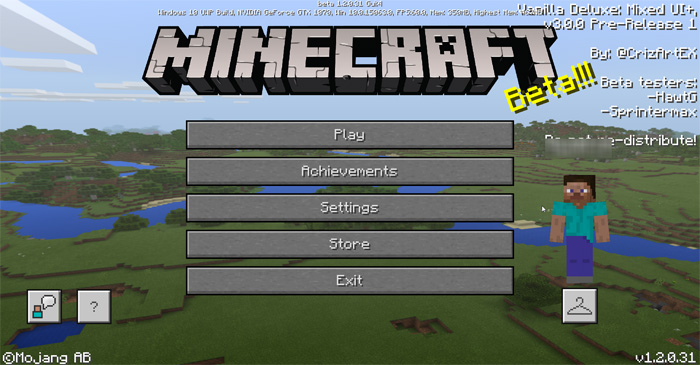
About Vanilla Deluxe: Mixed UI Pack
This resource pack comes with a modified interface which is based on two previous packs called Modified Vanilla and Vanilla Enhanced. This new iteration includes a recreation of a mixed interface between Minecraft: Java Edition and 4JS Console Edition. As it’s not a completed product yet there are still some things left to do so more updates can be expected in the future.
Creator: CrizArt EX Updated: 26 November, 2017 (read changelog)
What are the new features? Here is a list of features the Vanilla Deluxe: Mixed UI includes:
This texture pack includes a Java Inventory interface but it only works in survival mode due to limitations by the internal code for creative mode. However, this feature will be added in Legacy GUI Pack (previously called PC GUI Pack) HUD has been modified with the original experience bar and level number with borders A mixed interface between Java and Bedrock for the Recipe Book Uses interface of 4JS’s console for Start, Progress, Death, Sign, In Bed and Pause. Modified interface appears in the Classic UI profile selected New texts for the loading screens New UI for the full creative
Note from the creator
The only advantage that you can take is about to use some Java container textures for Bedrock! But some GUI has different adjustments of gui pieces like flame, arrow, or extra grids for custom recipe book. Everyone can use it to port Java GUI textures to Bedrock as long as they ask me first and authorize it and ensure that it must credit me by the contribution of the modified UI that I did for that possibility.
But there is an exception, you can’t strictly port the PureBDcraft java container GUI to bedrock, since the same creator (Sphax84) is doing the classic HD GUI for bedrock 1.2 better together update in marketplace ;D More information in the file “Terms of use!.txt”
And before downloading this feature pack, first make sure you have the display device with medium or high resolution as a requirement.
Some textures were originally based by 4Jstudio and Microsoft, but still not exact dimensions or texture design as confirmed.
Changelog v3.2:
Updated for Minecraft 1.2.5 and 1.2.6 Beta. Added new full creative modified UI (WIP design) Touch mode support Removed some text from the Start Screen Added new texts for the loading messages Close button no longer appears if using the mouse, keyboard of an Xbox One controller Added new template for Java Edition container (Classic UI) resolution GUI about 2048x
How to install Vanilla Deluxe: Mixed UI Pack
- Download the .mcpack file using the button on this page.
- Open the downloaded file with Minecraft Bedrock Edition.
- Wait for Minecraft to confirm that the import has completed.
- Activate the imported pack in the world settings.
- Back up important worlds before installing community content.
Download Vanilla Deluxe: Mixed UI Pack Textures for free


