
About Controller Tooltip Selector Pack
This pack allows you to choose between 9 different designs for how the controller tooltips look. It’s very easy to change the designs as it can be easily managed from within the game. The controller tooltips include designs from Xbox (Bedrock & Console), Nintendo: Switch, PlayStation and all other editions.
Creator: AgentMindStorm Updated: 27 March, 2018 (read changelog)
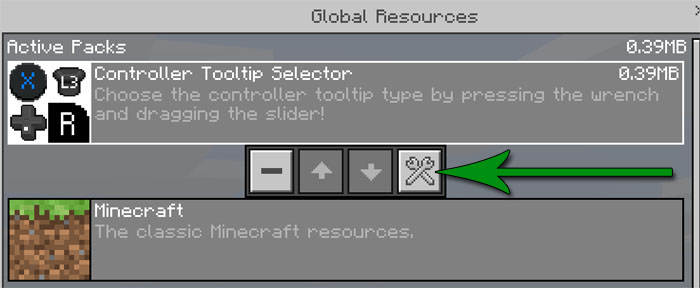
How does it work? You can change the type by selecting the wrenches (in /Settings/Global Resources/) and dragging the slider.
After the slider has been moved to the correct style, reload the game as it currently does not change until you reload it.
Tooltip Styles Automatic (Bedrock): This is the default setting for Minecraft. Automatic (Console): This will use the button styles from Minecraft Console Edition. It automatically checks what platform you\’re playing on and adjusts the button tooltips accordingly. Generic (Bedrock): This is what will show when you hook a controller up to a tablet or phone. Generic (Console): This shows the colors of the generic buttons with the style of Console Edition. Xbox (Bedrock): These are what show when you are playing on Xbox One or Windows 10 with a controller. Xbox (Console): These are the tooltips that appear in Minecraft: Xbox One Edition. Switch (Bedrock): These are what appear when you\’re playing on Nintendo Switch. Switch (Console): This is the set that is used in Minecraft: Nintendo Switch Edition. PS4 (Bedrock): These were found in the game’s files, and would appear if Minecraft (Bedrock Edition) was on PS4.
Changelog
Modified the Switch (Console) circle button tooltip to match the controller’s actual button Added missing SL, SR, and Touchpad tooltips for Switch (Console) subpack Added missing plain dpad and touchpad tooltips for Xbox (Console) and Generic (Console) subpacks Removed unnecessary switch plain dpad textures
How to install Controller Tooltip Selector Pack
- Download the .mcpack file using the button on this page.
- Open the downloaded file with Minecraft Bedrock Edition.
- Wait for Minecraft to confirm that the import has completed.
- Activate the imported pack in the world settings.
- Back up important worlds before installing community content.
Download Controller Tooltip Selector Pack Textures for free


