
About Redstone ATM
The Redstone ATM is a very clever machine which can be used for conveniently managing your valuable items in Minecraft while making sure they are kept safe. It’s entirely powered by redstone and command blocks and it can host a multitude of different accounts and keep track of a wide range of items without problems.
Creator: NobakynNogame Other Credits: Skippy 6 Gaming (original idea)
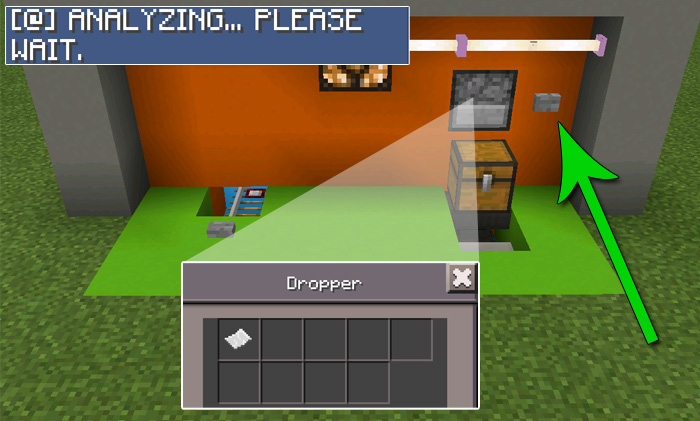
How does it work? Open the chest and take one of the key cards. There are both fake key cards and real ones. It’s to demonstrate that you will need a specific key card to access certain chests and if you try access the ATM with a fake on you won’t gain access.
Insert the obtained key card into the dropper and then press the button on the right side of the ATM to request access to your account. It’ll short thereafter analyze your request and depending on your key card determine a process.
In this case, I inserted a functioning key card and as a result I got access to the minecart with a chest. It’s basically the account which contains the account’s items or blocks.
You can either deposit or withdraw items from the chest. Don’t forget to get the key card from the chest before closing your account (also known as pressing the button to push the minecart back into the vault).
Important: This addon is limited to 1.1.0.8 beta users only
How to install Redstone ATM
- Download the .zip file using the button on this page.
- Open the downloaded file with Minecraft Bedrock Edition.
- Wait for Minecraft to confirm that the import has completed.
- Select the imported world from the Minecraft world list.
- Back up important worlds before installing community content.
Download Redstone ATM Creation for free


