
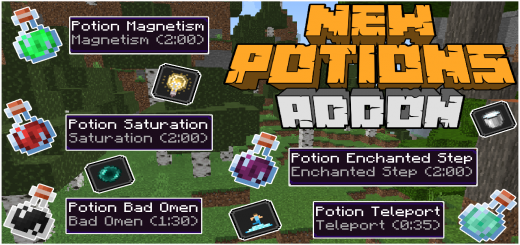
About NewPotions Addon
Created by By SystemTv
- turn on experimental
If you put the following command you can get the new potions, /give @s new
The new potions will also be found in the creative section, in the potions group, here is an image so that you have a better idea of where to find them.
- Potion Magnetims
it will grant you the ability to attract all nearby items in a radius of 8 blocks, these items will follow you until they enter your inventory
- Potion Enchanted Step
it allows you to go through water and lava by walking or running as it turns water into ice and lava into netherrack.
- Potion Teleport
this effect allows you to teleport wherever you look as long as you crouch.
- Potion Anti Magic
it gives you the ability to not be affected by negative effects, be it weakness, vaneno, wither, fatigue, etc.
- Potion Light
it allows you to illuminate everything around you, it would be best to use it in caves or at night.
- Potion Village Hero
This potion will help you get offers from the villagers and so you don't get ripped off
- Potion Bad Omen
This potion will give you a bad omen, the smartest thing to do would be to use it while you are near a village
- Potion Conduit Power
This potion will grant you the effect of power of the conduit that allows you to breathe underwater and see things much better underwater
- Potion Fatal Poison
it will kill you if you consume it, the most intelligent thing would be to use it as a sentence or some trolling.
- Potion Saturation
will grant you the saturation effect for 2 min, this effect will grant you immunity to hunger, that is, you will not be able to be hungry for 2 min
NewPotions Addon screenshots


How to install NewPotions Addon
- Download the .mcaddon file using the button on this page.
- Open the downloaded file with Minecraft Bedrock Edition.
- Wait for Minecraft to confirm that the import has completed.
- Activate the imported pack in the world settings.
- Back up important worlds before installing community content.
Download NewPotions Addon (1.17, 1.18) Magic for free


