
About RuneCraft
Created By Estrongel
- Turn on experimental settings in your world
RuneCraft adds complex skill systems that have never been seen in Minecraft. Drawing inspiration from MMORPG giants like Ultimate Online and Old School Runescape, this add-on creates a unique experience that overhauls how you play Minecraft!
Runecraft 1.0 Rewritten overhauls all of the existing skills, and systems, adds several new skills, implements the Prayer system, adds collectibles, new ores, music discs, and more!
Gameplay Changes Players in Creative will no longer run out of stamina Players in Creative can now use equipment they would otherwise not meet the level requirements for The HUD is now hidden while in creative Piglins will not attack players wearing Black equipment All existing recipes (aside from armor and tool recipes) using ore that has been removed has been reworked to use new ore Players who reach level 99 and 120 in a skill will have their name broadcast globally
Reworked HUD
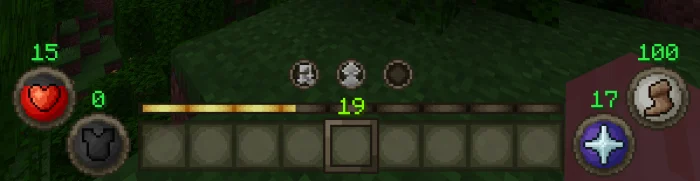
The HUD of any game is what's most important, with Runecraft 1.0 the HUD has been completely redesigned to show players Health, Armor, Stamina, Prayer Points, and set Prayers. With the hunger system removed, there was no longer a need for a hunger bar.
Redesigned the entire HUD From left to right: Health orb, Armor orb, Prayer Slot 1, 2, and 3, Prayer orb, Stamina orb Several effects will change the color of the health orb along with a hierarchy of which effects will take priority: Red: A red orb indicates that the player has no effects that can affect their health Gold: A gold orb indicates the player has the absorption effect This display takes priority over all other effects Green: A green orb indicates that the player has the poison or fatal poison effects This display takes priority over the wither effect Black: A Black orb indicates that the player has the wither effect This display will be overridden by all other effects The Prayer and Stamina orbs have an alternate display when they are active
Ore Generation
All vanilla ore has been replaced with custom versions Several new ores were introduced to generation: Tin Ore Mithril Ore Adamant Ore Rune Ore
Structures
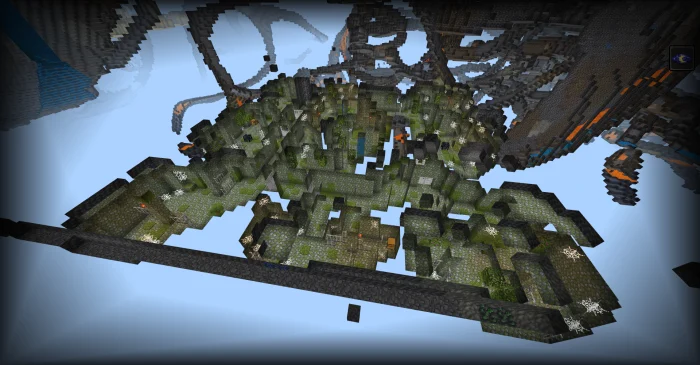
Several new structures have entered the world of Runecraft. Inspired by OSRS, they are the Strongholds of Security! Exploring these subterranean structures can yield rare loot, but be careful, danger lurks around every corner!
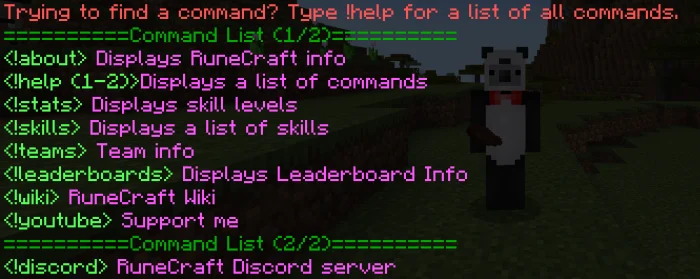
Custom commands are a way for players to access information quickly without needing to open up a wiki or ask a question in a discord server. Runecraft has a lot going on, so shortened descriptions on topics that may be confusing and general info on how to unlock things is an important feature. To start with, type "!help"
Added custom commands into Runecraft Which can be used to
General Info about Runecraft See skill stats without needing an item Get a general description of skills View unlocks for skills View leaderboards for skills Select teams Other useful links and credits
Skills
The skill systems of Runecraft are what allow people to truly play the game of Minecraft differently. Several overall changes have been made to make the skill systems more rigid and definable.
Changes Players no longer gain XP while in creative/spectator mode Several Skills have been redesigned/reworked XP Scaling and requirements have been modified to increase the time it takes to level up Additional values were added to XP requirements early on to prevent players from being spammed with level up sounds Several new skills were added: Mining Digging Farming Woodcutting Several existing skills received functionality: Attack Defense Prayer
RuneCraft screenshots
How to install RuneCraft
- Download the .mcaddon file using the button on this page.
- Open the downloaded file with Minecraft Bedrock Edition.
- Wait for Minecraft to confirm that the import has completed.
- Activate the imported pack in the world settings.
- Back up important worlds before installing community content.
Download RuneCraft (1.19) Gameplay for free


