
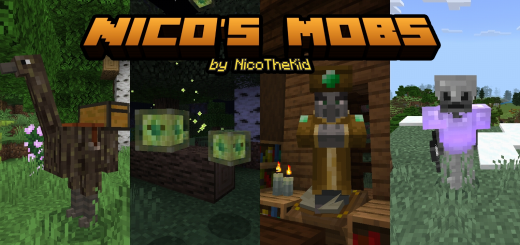
About Nico's mobs
Turn on experimental options in map settings!
Created By NicoTheKid
This mod will add new mobs that can spawn naturally your world. Each mob had different abilities & unique loots. Some mob can be tamed and other very dangerous. Mobs are designed to match the vanilla style of Minecraft.
Aside from new mobs, this mod also adds some new blocks and items.
Skeleton Guard
- Hostile Mob.
- Spawn in Overworld surface & underground.
- Health: 20
- Drop: Bone, Stone Sword & Chainmail Armor.
- Attack Damage: 3
Dire Bat
- Hostile Mob.
- Spawn in all Underground.
- Health: 14
- Attack Damage: 2
- Attack Effect: Hunger (0:10)
Mud Cube
- Hostile Mob.
- Spawn in Forest, Birch Forest, Roofed Forest, Swamp, & Taiga.
- Health: 16
- Drop: Mud Ball
- Attack Damage: 3
- Attack Effect: Slowness (0:10)
Scorpion
- Hostile Mob.
- Spawn in Plains, Flower Forest, Forest, Birch Forest, Roofed Forest, Swamp, Jungle, Taiga, & Savanna.
- Health: 16
- Drop: Scorpion Telson & Spider Eye.
- Attack Damage: 2
- Attack Effect: Hunger (0:10)
Cursed Book
- Hostile Mob.
- Summon by Enchanter Apprentice.
- Health: 8
- Drop: Paper, & Book.
- Attack Damage: 1
Enchanter Apprentice
- Hostile Mob.
- Spawn in all Overworld.
- Health: 30
- Drop: Emerald, Bottle o' Enchanting, Book, & Enchanted Book.
- Summon Mob: Cursed Book [3 to 4]
Curced Scaresrow
- Hostile Mob.
- Spawn in Plains, Flower Forest, Forest, Birch Forest, Roofed Forest, Swamp, Jungle, Taiga, & Meadow.
- Health: 20
- Drop: Wheat, Stick, Hoe, & Curved Pumpkin.
- Attack Damage: 2
- Cursed Scarecrow will also attack Iron Golem, Villager, Wandering Trader, Wandering Collector, Cow , Donkey, Mule, Horse, Llama, Sheep, & Wolf.
And many others!
Nico's mobs screenshots


How to install Nico's mobs
- Download the .mcaddon file using the button on this page.
- Open the downloaded file with Minecraft Bedrock Edition.
- Wait for Minecraft to confirm that the import has completed.
- Activate the imported pack in the world settings.
- Back up important worlds before installing community content.
Download Nico’s mobs (1.19) for free
Preparing your download…
If the download did not start automatically, click here.


