
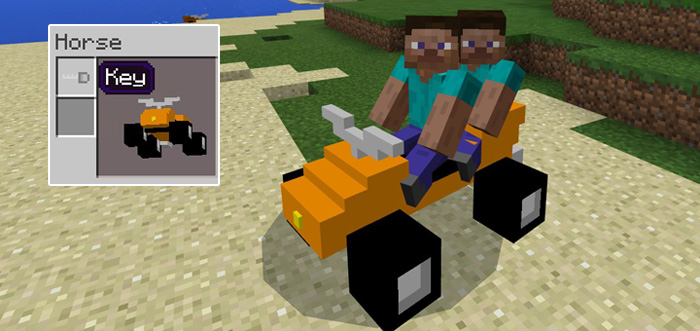
About Mine-QuadBikes Add-on
A quad bike is a four-wheeled vehicle which is designed to work in most terrains except for obvious ones such as water or lava. It’s a pretty fast vehicle which can carry up to two players at the same time. It exists in lots of different colors so the chances that you will find something you like are very high!
Creator: MicoLets_MC
How to drive a quad bike? The quad bikes replace horses, mules and donkeys and that means you can find them spawning mostly in plains biomes. Once you’ve found one you will need a key (saddle) but before you can drive it you will need to tame it. Oh yes, you heard that right.
Sit down on the bike (similarly to a horse) and wait until you see some red heart particles.
iOS / Android: Long press on the bike and press Mount Windows 10: Right-click on the bike to mount it Then open the inventory (while seated on the bike) and add the key. You can now drive the quad bike and it is also possible for another player to ride on the back.
You can upgrade the bike by adding armors and spray paints (horse armors) to them. This is only possible for some bikes. If you don’t see the option for the bike you’ve got then you just need to find another one which has this supporting feature.
You can repair bike by feeding a horse some golden carrots.
How to install Mine-QuadBikes Add-on
- Download the .mcpack file using the button on this page.
- Open the downloaded file with Minecraft Bedrock Edition.
- Wait for Minecraft to confirm that the import has completed.
- Activate the imported pack in the world settings.
- Back up important worlds before installing community content.
Download Mine-QuadBikes Add-on Transport for free


