
About Coral Blocks
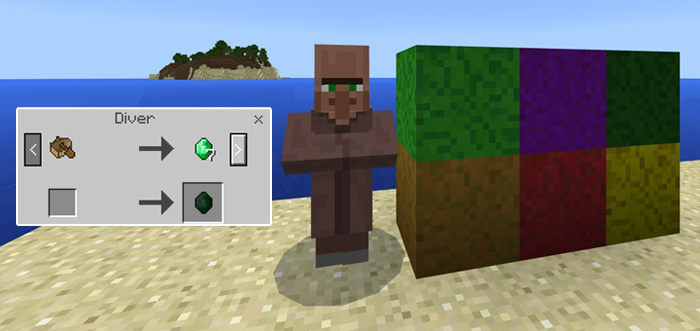
The Update Aquatic will introduce a diverse amount of new blocks, including Coral Blocks. This addon uses unused block data values to add 16 new blocks and 10 new fences to Minecraft. It’s based on the few images released by Minecraft during Minecon. The final blocks will most likely look completely different to these.
Creator: solvedDev
How to obtain the new blocks? Use a boat on a villager to turn him into a diver. You need to trade with him in order to unlock all of his offers, including the new coral blocks and fences.
In creative, you can use the following commands to retrieve the blocks more easily
/give @s planks 1 [6-15] /give @s fence 1 [6-15] /give @s prismarine 1 [3-8] Keep in mind that this is a concept creation. It was already confirmed that the coral textures in the video clip showcased during Minecon aren’t finalized and are subject to change. I (solvedDev) got inspiration from the clip but tried to give my own touch to them.
How to install Coral Blocks
- Download the .mcpack file using the button on this page.
- Open the downloaded file with Minecraft Bedrock Edition.
- Wait for Minecraft to confirm that the import has completed.
- Activate the imported pack in the world settings.
- Back up important worlds before installing community content.
Download Coral Blocks Cosmetic for free


