
About Vanilla Vehicles
This addon adds five modern vehicles and included are everything from cars to a flyable airplane. All vehicles are designed to stay true to the original Minecraft graphics so this makes them a great compliment for the game experience. Replace your horses with the latest technology today!
Creator: Vladu11
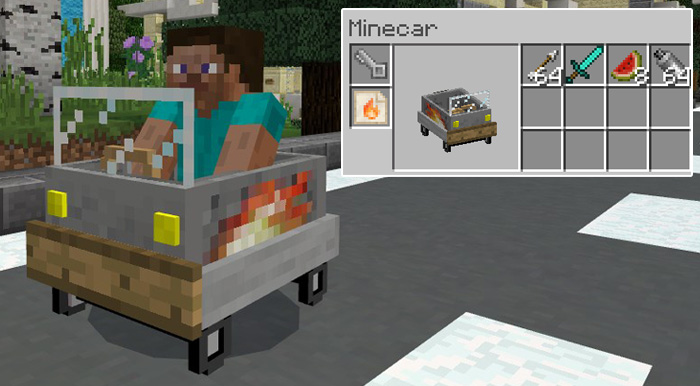
How does it work? The horses have been replaced by five new vehicles. Driving works just the same as riding a horse. Equip the vehicle with a key to be able to control it.
iOS / Android: Long press on the vehicle and press Drive/Fly. Equip it with a key to control it. Windows 10: Right-click on the vehicle to drive / fly it. Equip it with a key to control it. Minecar: This vehicle is the fastest land vehicle of them all. You can customize it with stickers and use cauldrons to dye the Color Overlay Minecar Stickers. To start driving you’ll need to equip the car with a key.
Minemarine: This vehicle is designed for underwater driving. It lasts for a very long time underwater and is really the ultimate vehicle for your travels in the ocean. Driving works similar to a car. Equip the car with a key to start the engine and be able to start driving.
Mineplane: It’s not the fastest or most technically advanced airplane, but at least it can fly. Equip the airplane with a key and then start driving forward and it will eventually lift. You need to re-equip the key after 3-4 minutes to make it start flying again.
Miniminecar: This is basically a miniature version of the Minecar. It’s much smaller and slower but it does have one advantage and that is the fact that it can jump!
Minebus: This vehicle can seat up to five players at the same time. Go on a trip with your buddies and let everyone ride together in the same vehicle. The first player riding it will be the one controlling the vehicle and the others will be passengers.
Upcoming Features Minescooter Trade machine which will randomly spawn in the world (will be able to be used for trading Minecars, Keys, Sprays and Stickers in surv
How to install Vanilla Vehicles
- Download the .mcpack file using the button on this page.
- Open the downloaded file with Minecraft Bedrock Edition.
- Wait for Minecraft to confirm that the import has completed.
- Activate the imported pack in the world settings.
- Back up important worlds before installing community content.
Download Vanilla Vehicles Transport for free


