
About Minecon Earth Mobs
Minecraft recently announced that they will add one new mob to the game and on November 18th (during Minecon Earth) you will be able to vote on your favorite. This add-on explores the four different possibilities. And except for some basic sketches (released by Minecraft) very little is known about the new mobs. This means that the add-on creator had very little to go on when designing these concepts.
Creator: StarkTMA
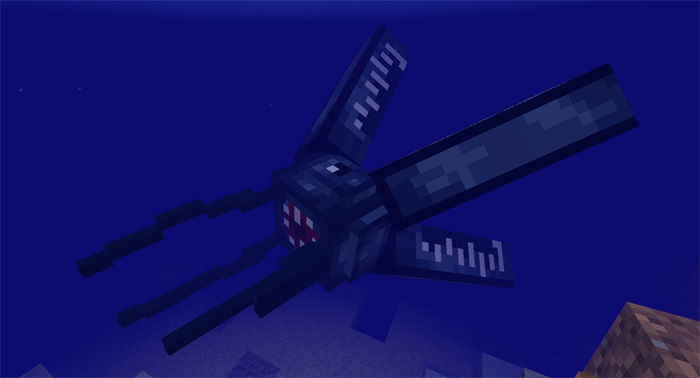
Mobs Titan Squid: This mob replaces squids and it only spawns in water. It’s basically a mutated and much more powerful version of the squid. Due to current behavior pack limitations not much can be done to to modify its behaviors. However, one cool and unique feature is that it will cause slowness effect to anyone who attacks it.
The Thing: It doesn’t look very dangerous, does it? But don’t be fooled. As soon as one is spawned another four of them will spawn. Basically every time a “Thing” spawns it has a 50% chance of summoning four other “Things”.
They are naturally hostile and will inflict a levitation effect which lasts for five seconds. This is by no means useful as it will give them enough time to regroup underneath you and then attack you as soon as you fall down on the ground.
It replaces pigs and can be found spawning in most biomes.
The Ray: The mob looks similar to a stingray and it’s abilities are not that dissimilar. For example, it causes 30 seconds blindness to any target which attacks it. This is probably to simulate the effect of being stung by this water creature.
It replaces chickens and as a result you can find it spawning only on land. The only way to get them in water is to spawn them there yourself.
Blaze King: This mob replaces the witch. It’s one of the most dangerous mobs of the four as it will summon four blaze mobs and shoot rapid fireballs. It does have a weakness though, and that’s water.
How to install Minecon Earth Mobs
- Download the .mcpack file using the button on this page.
- Open the downloaded file with Minecraft Bedrock Edition.
- Wait for Minecraft to confirm that the import has completed.
- Activate the imported pack in the world settings.
- Back up important worlds before installing community content.
Download Minecon Earth Mobs for free


