
About Better Storage Add-on
Storage Creates are a new type of block (added by this add-on) which lets you store all of your items (e.g. carrots) in one particular block. The crates are sold by a new type of villager known as a crate seller. Neither of the crates replace any of the used blocks in-game so this makes it a perfect addition to the game. It’s a really cool idea which greatly enhances the storage possibilities in-game.
Creator: Kingbudderjr
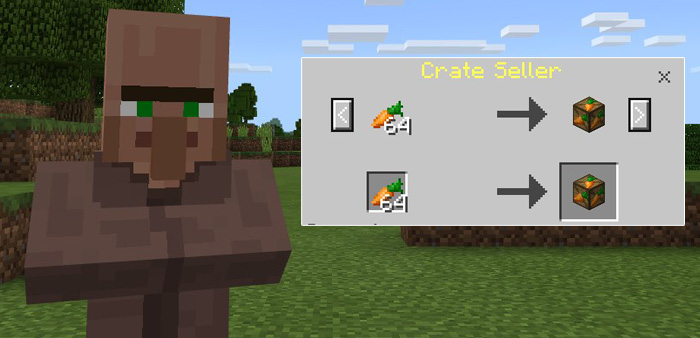
How does it work? Creates are sold by Crate Sellers which is a new type of villager found in villages. For example, if you want a carrot crate then you can get one by giving a Crate Seller 64 carrots.
Here is a list of crates you can buy.
Bone Crate – 64 Bones Gunpowder Crate – 64 Gunpowder Spider Eye Crate – 64 Spider Eyes Rotten Flesh Crate – 64 Rotten Flesh Carrot Crate – 64 Carrots Potato Crate – 64 Potatoes Sugar Cane Crate – 64 Sugar Canes A crate can then be placed down anywhere you like. This is quite convenient as it gives a better overview of your current food and item supply. However, at this point it’s limited to just 7 different items.
You can retrieve the items from the crate by trading it with a Crate Seller. For example, one Carrot Crate will give you back 64 carrots.
How to install Better Storage Add-on
- Download the .mcpack file using the button on this page.
- Open the downloaded file with Minecraft Bedrock Edition.
- Wait for Minecraft to confirm that the import has completed.
- Activate the imported pack in the world settings.
- Back up important worlds before installing community content.
Download Better Storage Add-on for free


