
About Organized Settings
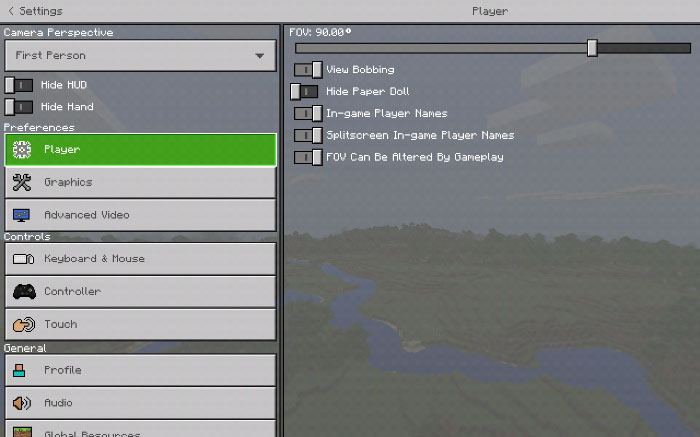
This addon lets you access a few really useful settings through a new menu in the in-game user interface. Most of these options are otherwise only limited to the Video Settings screen and normally you would need to scroll a lot to get to them. It’s very useful if you need more quick and easy way to access them.
Creator: NetherNinja Updated: 11 April, 2018 (read changelog)
How does it work? Here is a list of settings you’re able to quickly access from the Quick Access settings screen.
Field of View Camera Perspective Hide Hand View Bobbing In-game Player Names Splitscreen in-game names Hide paper doll Inventory tweak NEW toggle icons MORE divided settings Cleaned advanced video Screen animations button (new) Changed inventory (added difference photos in-game ) (new) Added language support (WIP + new) Hide HUD and hide hide are easier like third person (new)
Changelog
Fixed error for pack Fixed storage tab and resource from disappearing
How to install Organized Settings
- Download the .mcpack file using the button on this page.
- Open the downloaded file with Minecraft Bedrock Edition.
- Wait for Minecraft to confirm that the import has completed.
- Activate the imported pack in the world settings.
- Back up important worlds before installing community content.
Download Organized Settings Addons for free


