
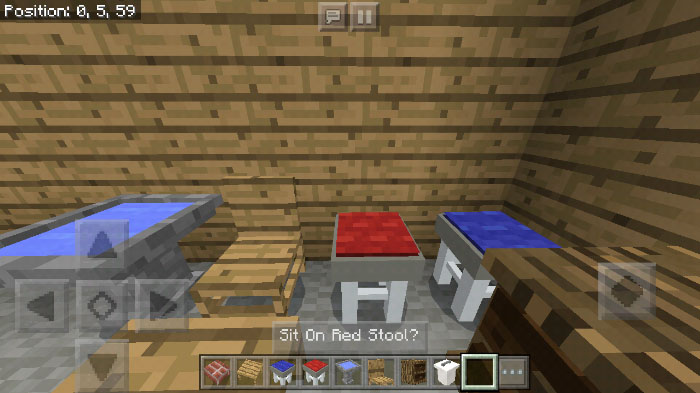
About DarkGlade03’s Furniture
This add-on replaces the shulker in-game with an egg which by using various dyes can be transformed into multiple different furniture. Some of the furniture already have some behaviors. For example, you can sit on the chairs and use the trashcan for getting rid of items. However, more features will be added in the future. It’s great if you’re looking for new ways to decorate your home!
Creator: DarkGlade03 Updated: 5 May, 2018 (read changelog)
How does it work? To spawn an item place down the Undyed Shulker which appears as a small brick with the Shulker Spawn Egg. Next use one of the dyes which names and icons have been changed to dye the Shulker.
Then use any of the following dyes to transform the egg into a furniture.
Furniture Creator (Shulker Spawn Egg) Red Chair (Pink Dye) (Behavior: Sittable) Oven (White Dye) (Behavior: Cook food (Raw Beef, Raw Porkchop, Raw Chicken, Raw Rabbit)) Trash Can (Purple Dye) (Behavior: Throw away items) Blue Stool (Light Blue Dye) (Behavior: Sittable) Oak Chair (Red Dye) (Behavior: Sittable) Bedside Cabinet (Lapis Lazuli) (Behavior: 27 storage slots) Lamp (Black Dye) Bird Bath (Orange Dye) Oak Table (Silver Dye) Couch (Cyan Dye) (Behavior: Sittable) Wool Chair (Ink Sac) (Behavior: Sittable) Steve Statue (Green Dye) There are no other free models! All of the furniture can only be used as a decoration as there is no behavior pack to change their functionality. This also means that all of them will behave like shulkers.
More features will be added in a future update.
You can sit on all types of chairs and you can also throw away unwanted items by using the trashcan.
There are some free models included in the pack which you can use to make your own furniture addon!
Changelog
Added a Steve statue
How to install DarkGlade03’s Furniture
- Download the .mcpack file using the button on this page.
- Open the downloaded file with Minecraft Bedrock Edition.
- Wait for Minecraft to confirm that the import has completed.
- Activate the imported pack in the world settings.
- Back up important worlds before installing community content.
Download DarkGlade03’s Furniture Cosmetic for free


