
About Easy Bonsai (1.14)
The world must be on Experimental Mode.(!)
This add-on adds a new entity and many items in your world that can help you get more wood and leaves.
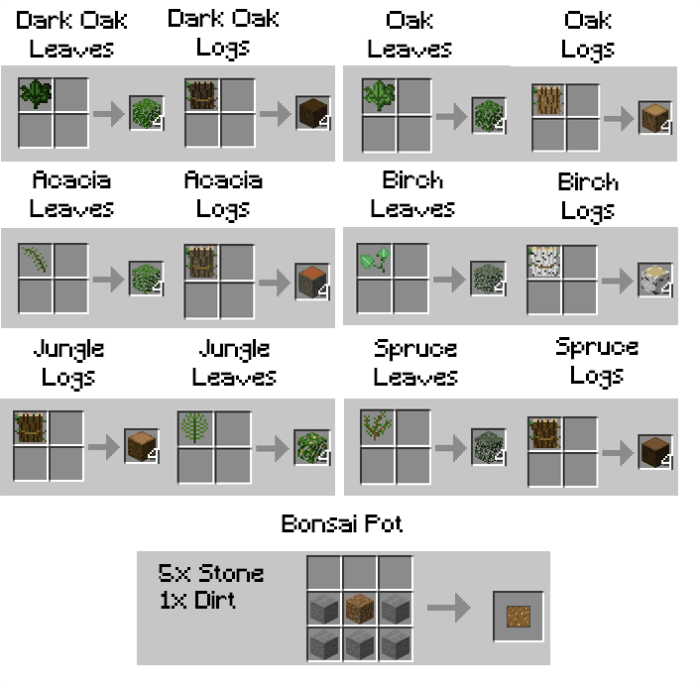
This add-on adds 12 new items that can be crafted into wood and leaves material. The item dropped depends on what kind of sapling is planted on the pot.
How do I use the Bonsai Add-on you ask? It is quite simple.
By holding the pot in your hand the pot would appear in front of you. – TO Place – Right Click/Hold screen to place the pot.
– TO Cancel Place – Just switch to another item.
2 Get a sapling then interact with the Bonsai Pot.
Mobile – A button should appear when looking at the pot or long tap the Bonsai Pot while holding the sapling.
- You got yourself a Bonsai Tree with your preferred tree!
You can also put the Bonsai Plant on top of a hopper to pick up all the items dropped by the Bonsai Tree.
How do I break the Bonsai Trees? Interact with them using a wooden shovel and it would drop the Bonsai Pot. It does not reduce the shovel’s durability.
Bonsai Pot: 5x Stone + 1x Dirt
How to install Easy Bonsai (1.14)
- Download the .mcpack file using the button on this page.
- Open the downloaded file with Minecraft Bedrock Edition.
- Wait for Minecraft to confirm that the import has completed.
- Activate the imported pack in the world settings.
- Back up important worlds before installing community content.
Download Easy Bonsai (1.14) Technology for free


