
About More Zombies (1.14|1.16)
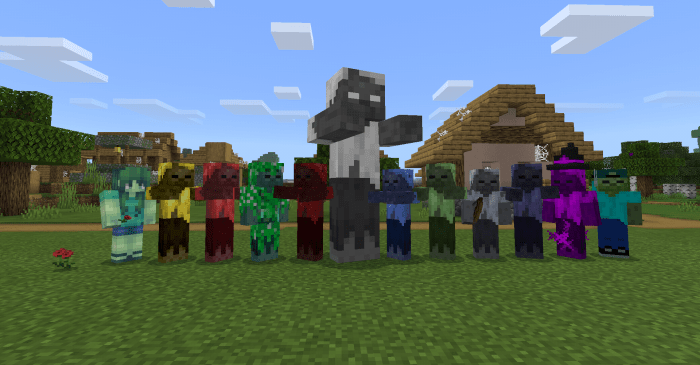
Do you think there should be more zombies in the game? Because this add-on does this, it adds twelve zombies in the game, but they are zombies with behaviors other than normal zombies.
Of the twelve zombies two are neutral, they will only attack to defend themselves, they are: Zomboy Zombie Lady (Zombie lady and Zomboy can be tamed with an apple)
The other will attack the player as follows
Zombie Archer: Uses a bow and attacks the player at a distance
Zombie Teleport
Attacks with poison and can teleport
Zombie Evocator
Attacks with blindness, can tame wolves and make them red and angry and invokes small zombies and zombies teleport. Baby only uses melee attack with effects
Invisible Zombie
It becomes invisible at the moment of battle, returns to normal after winning the battle or after a while if it is not killed
Explosive zombie
Transform nearby Creepers in the charged state Two types of attack, can explode or use melee attack, when approaching the player he will decide
Crescent Zombie
When he gets close enough to the target he gets twice as big, back to normal after eliminating the target in some cases
Colorful Zombie
Afterseeing a target begin to change color, each color will give the target a different attack effect. Returns to normal if target is killed or able to escape
Zombie Boss
300 HP HP Bar Attack from a distance by throwing head of zombie boss, and summon baby zombie with bow and baby zombie with blind attack Appears when a hostile zombie from the add-on is struck with lightning
Fire zombie
When he finds a victim he leaves a trail of fire Body attack using poison
Zombie Warlock
Attacks with portions like a witch
How to install More Zombies (1.14|1.16)
- Download the .mcpack file using the button on this page.
- Open the downloaded file with Minecraft Bedrock Edition.
- Wait for Minecraft to confirm that the import has completed.
- Activate the imported pack in the world settings.
- Back up important worlds before installing community content.
Download More Zombies (1.14|1.16) Mobs for free


